 Visiting Virtual Dōtonbori in VRChat on Linux
At the end of 2025, I decided to cleanly switch over to a Linux distro as the main OS on my desktop. This coincided with the end of support for Windows 10, questionable quality of Windows 11 with updates introducing worse performance, bugs and security issues, and the realisation that I could probably find all the alternatives I need on Linux. In my case, “absolutely” is more appropriate than “probably”, and my surprise at the improvement of support for the Linux desktop experience and gaming on Linux really took me by surprise.
I take comfort in knowing I’m not alone in my switch, given that Valve recently released statistics from the latest Steam hardware survey showing Linux usage percentage hitting an all-time high of 5.33%, showing a mixture of distros including not just SteamOS, but other popular distros such as Ubuntu, Linux Mint, Manjaro and more. Support for most games feels seamless with improvements to Wine and Proton, and many developers continuing to release native Linux builds for their games. You may expect something like VR to fall behind in terms of support on Linux, but my exploration has shown me it’s possible to have an equivalent VR experience than Windows (it’s even better in some ways!).
To start off simply, here is my personal stack for VR in Linux.
- CachyOS - My current daily driver distro
- Oculus Quest 2 - The ol’ reliable but now discontinued entry-level VR headset
- ALVR - This replaces Oculus Air Link and allows connecting to my headset over WiFi
- ProtonGE - Custom builds of Proton that extend Proton’s support of different media formats.
- HaritoraX Wireless - Wireless 8-point full-body tracking (FBT) for social VR and motion capture. Now discontinued, replaced by the 2nd version
- SlimeVR - FBT server for connecting the trackers to my PC, then to SteamVR
- SlimeTora - Cross-platform, open-source application that allows Haritora trackers to communicate to SlimeVR server.
- WayVR - Enables Wayland support for desktop passthrough into VR
CachyOS
CachyOS is an Arch-based Linux distro designed with gaming in mind. It ships with package builds gaming-optimized for many different hardware configurations, a quick installer with support for Nvidia drivers out-of-box and kernel optimizations for better performance. My experience with CachyOS over the past few months has been very smooth - I stuck with the default install options and got started with KDE Plasma, which is one of the nicest DEs I’ve used so far. There are frequent updates for system packages and the stability is noticeable.
 Haven’t looked back since installing it.
ALVR
ALVR is what I use as a replacement for Virtual Desktop, allowing wireless streaming over WiFi from my Linux machine to my headset. It depends on the SteamVR runtime to function, but functions in a very similar way to VD (and is also free and open-source!). I have heard other people recommend WiVRn server instead, as it implements OpenXR without depending on the SteamVR runtime. This seems to help some people that experience jittery visuals when using ALVR, however your mileage may vary.
Another important thing to note is that for any wireless VR setups, it is a very good idea to have your PC connected to Ethernet, use a dedicated router in AP mode and only connect your VR headset to it. This helps a lot with interference, especially if your computer is far away from the main router. The following diagram shows a basic setup that enables this for me.
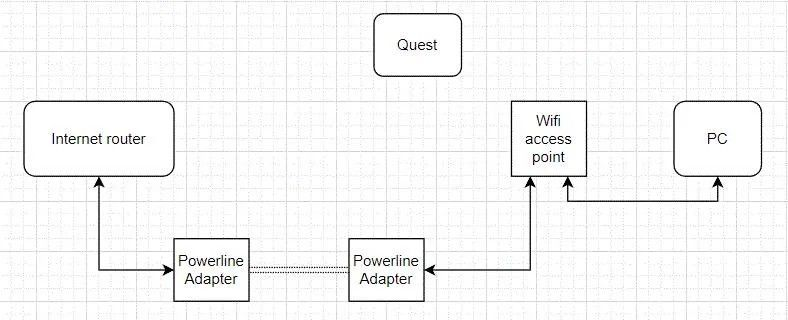 Note that I use Powerline instead due to the fact I’m renting and can’t drill holes to run Ethernet through the walls. :(
ProtonGE
The Proton-GE repository on GitHub hosts different builds of Proton which include additional features not supported or enabled in the officially distributed binaries. One in particular is recommended for my primary use case - VRChat. When using a Proton runtime installed by Steam, you may notice that some features such as video/audio playback in worlds doesn’t seem to work. The Proton-GE-RTSP build includes additional codecs required by VRChat, which fixes issues such as broken video players in worlds.
HaritoraX Wireless
I’ve used the first edition HaritoraX Wireless trackers for a few years and found them to be a pretty effective FBT solution, circumventing the very heavy cost of other trackers like the Valve Index, requiring not only multiple £100 trackers, but also 2-3 fixed base stations. Haritora trackers work similar to SlimeVR - they use a combination of gyroscopic measurements and geomagnetic positioning to allow movement detection without needing to rely on any other external devices. They do drift a bit no matter how many times you calibrate them, but the feeling of being able to move your whole body around in VR space is unlike anything else. The main issue for Linux users is that the official Haritora configurator is only supported on Windows. Fortunately, a workaround is available by relying on SlimeTora and SlimeVR server…
SlimeVR/SlimeTora
SlimeVR server is a cross-platform, open-source program that allows for wireless FBT trackers to be configured and used in VR. It allows for many different configurations and number of trackers, and of course allows using your own DIY trackers if you’ve gone through the effort of making them. It includes many other useful features such as drift compensation, “stay aligned” poses and quick resetting. To use my Haritora trackers with SlimeVR, I’ve had to rely on a program called SlimeTora, which forwards data from Haritora trackers onto SlimeVR server. This works surprisingly effectively, I would even say the trackers seem to perform better than using the Haritora configurator. Whether you’re on Linux, Windows or Mac, if you have these trackers you should seriously consider giving it a try!
 Flexing in VRChat using FBT after spending hours figuring all of the above out for myself
Future work: WayVR and WiVRn
WayVR allows desktop passthrough for Wayland users, allowing you to see your own desktop inside your own headset. I haven’t set this up yet as it’s been lower priority on the list of essentials, but will update this section if it’s a success…
While WiVRn is also recommended as an alternative to ALVR by some people, I haven’t tried it yet so I can’t yet comment. I plan to give it a try and see if it has any difference to ALVR.
Conclusion
After the switch to Linux, I have almost entirely managed to replicate or even improve on the VR experience I used to have on Windows. I’m going to be treating this post as a living document to cover my VR experience in Linux, adding improvements and sharing any tips if I find any. For all mentioned resources, I recommend looking through the documentation and troubleshooting if you run into any issues. The Linux VR Adventures Wiki is also a fantastic resource for Linux VR, with many other resources and help available on it. Sorry if this post doesn’t help you to set everything up exactly, but I hope it provides a starting point for your journey. Best of luck!